
Since 13 November 2023, client-to-agent linking with the ATO has been compulsory for businesses. Seamlss shows your clients how to link to you when they finish onboarding or re-engagement, tells you when they’re done, and lets you send a reminder.
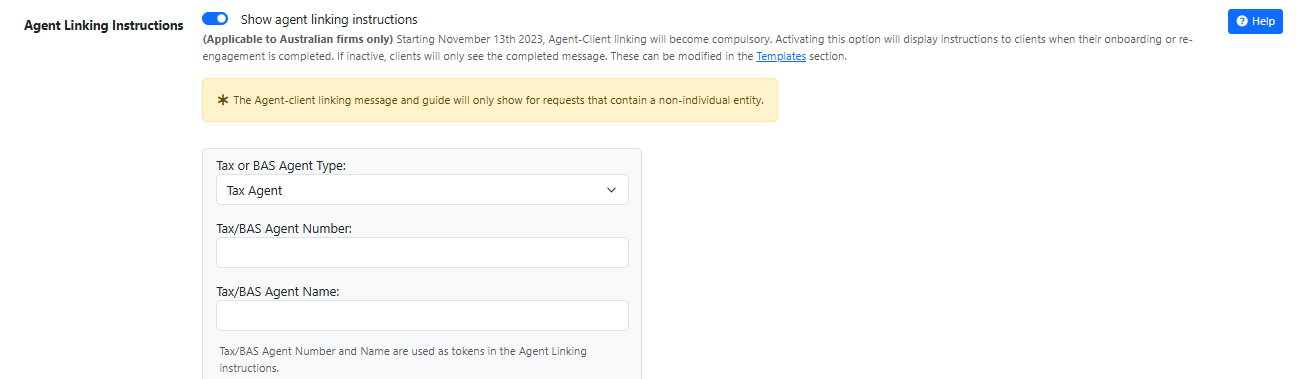
In Seamlss: Settings, the General tab, then Agent Linking Instructions.
Open SettingsWho it applies to. Australian firms only, and only clients that are companies, trusts, partnerships and other entities that aren’t individuals or sole traders.
Turn it on #
Switch on the instructions
In Settings, General, turn on Show agent linking instructions.
Add your agent details
Choose Tax Agent or BAS Agent, then enter your agent number and name. Seamlss puts them into the instructions clients see.
Save
Click Save Setting.
Get told when a client is done
In Settings, Notifications, turn on Completed Agent Linking, choose who receives it and click Save Notification Settings. Notification settings explains the recipients.
What your client sees #
When a client finishes an onboarding or re-engagement request that includes an entity that needs linking, they see the linking steps and a link to a full guide. At the end they tick the entities they’ve linked and click Update linked entities, and Seamlss tells you.
You can change the wording in Templates, Display: Onboarding Complete and Re-engage Complete. Send clients who get stuck to ATO agent linking for clients.
On the phone with a client? Open the same guide your client sees and talk them through it. Click Switch at the top of your dashboard to view Seamlss as a client, click your name at the top right, then Client-Agent Linking.
Check who has linked #
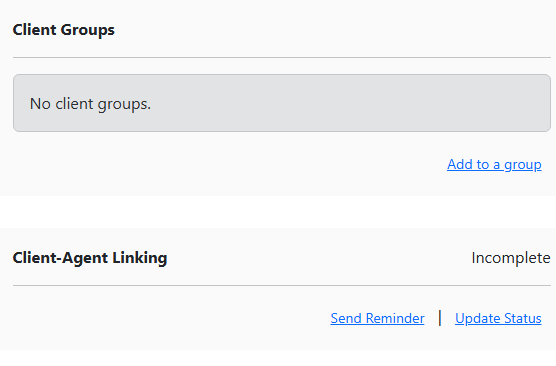
Open the client record for the company, trust or partnership. The Client-Agent Linking panel shows where the client is up to.
| Panel shows | What it means |
|---|---|
| Complete | The client ticked the entity off as linked, or you marked it done. Clients brought in from XPM start as Complete, because Seamlss takes it that clients already in your practice manager are linked to you. |
| Incomplete | The client finished their onboarding or re-engagement request but hasn’t told Seamlss they’ve linked. |
| – | The client hasn’t finished their request yet. |
How reminders work #
Seamlss doesn’t send agent linking reminders on a schedule. Clients get two nudges:
| Nudge | When |
|---|---|
| A banner in the client’s Seamlss account | Every time they log in, until each entity is ticked off: Complete your Client Agent Linking, with a link to the steps. Each entity still to link shows Agent Linking incomplete. The banner stays out of the way while the client has a request open. |
| A reminder email from you | Only when you click Send Reminder. |
Open the entity
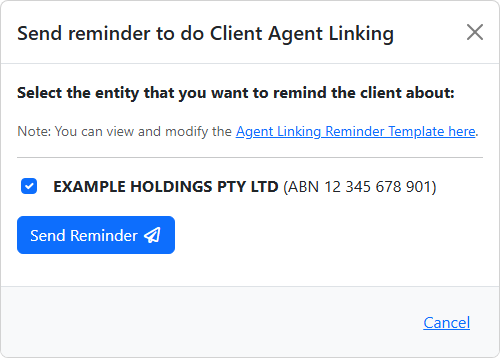
Open the company, trust or partnership showing Incomplete and click Send Reminder in the Client-Agent Linking panel.
Send it
The entity is already ticked. Click Send Reminder. The email goes to the entity’s primary contact. No primary contact? The window says so: add one to the record and try again.
The client links
The email uses your Agent Linking Reminder template in Templates, Comms. It walks the client through the ATO steps, lists the entities still to link and has a button to their agent linking page. There they tick the entities they’ve linked and click Update linked entities.
You’re told
The panel changes to Complete and the people you chose get the Completed Agent Linking notification. The reminder is recorded in the client’s history.
Linked, but Seamlss doesn’t know? If the client linked without ticking it off, click Update Status on the panel, tick the entity and click Update. Untick it there if an XPM client shows Complete but isn’t linked to you.
Something not working? #
My client didn’t see the instructions
Check Show agent linking instructions is on. They only show after an onboarding or re-engagement request, and only when it includes an entity that isn’t an individual or sole trader.
I wasn’t told the client finished
Check Completed Agent Linking is on in Notifications and has at least one person to send to. If the client skipped the last step, the panel won’t update either: use Update Status.
Clients see agent linking when it’s switched off, or it shows for an individual
That’s a fault on our side, not your settings. Contact support and tell us which request or link.
There’s no Client-Agent Linking panel on the record
The client is an individual or sole trader, who don’t need it, or your firm isn’t set up as Australian.
Still stuck? Contact support and tell us what you see.
More about the ATO’s rule: ATO agent linking in Seamlss. Want a guide with your firm’s details to send clients outside Seamlss? Make one with the agent linking guide builder.


